|
|||||||
| Workout Manager Support Post any questions or problems you’re having using our Workout Manager software here. We don’t provide email or phone support for our forums, website or Workout Manager software, but we will do our best to help you in this forum. |
This is a discussion on My Lost Rotation... within the Workout Manager Support forums, part of the Support Forums category;; Hi guys! I created a new rotation earlier today (FitnessFreak's Muscle Building & Cardio Rotation), saved it to my calendar ...
![]() |
|
|
LinkBack | Thread Tools | Display Modes |
|
#1
|
||||
|
||||
Hi guys!
I created a new rotation earlier today (FitnessFreak's Muscle Building & Cardio Rotation), saved it to my calendar and uploaded it for other people to use it. When I logged on now the rotation is gone both from the list of available rotations and from my calendar... Chris. EDIT: When I saved the rotation this morning, it showed on the list (along with my avatar and everything). Also, in the calendar I could see the little DVD-cover icons marked with "Rotation". Now, I only get a green little icon with "Rotation" on top in some days, in a few others a couple of DVD covers (without the "Rotation" mark) and when I click on any of the dates (the ones that either have the green icon or a DVD icon) I don't get anything scheduled for that date... Weird, huh? Last edited by christosz; 11-07-2008 at 04:21 PM.. |
|
#2
|
||||
|
||||
Quote:
|
|
#3
|
||||
|
||||
I pressed both "Upload & Share" and "Place In My Calendar" buttons, because the rotation showed up in both my calendar and the rotations listing.
I also played with Edit/Delete a Rotation I created just to see if my rotation shows up in there. It doesn't. Someone else's rotation shows up... I'll try re-creating the rotation today and see what happens. Chris. Last edited by christosz; 11-07-2008 at 11:44 PM.. |
|
#4
|
||||
|
||||
OK... I just re-created the rotation. It shows up in the "Newest Rotations" column and in the Edit/Delete Wizard (along with the other rotation which I didn't create - probably someone else's).
Here are the few glitches I discovered: 1-The rotation is showing up ok in my calendar but on several days I have another little green icon with "Rotation" written on top. 2-When I click on a date to view or modify the day's workouts I don't get them in the list (they show up ok in the calendar view, though) 3-I can't left-click on any of the DVD-covers to go into the workouts description. I only get the "cross" which allows me to move this workout on another date. 4-When I right-click on a DVD cover (with "Rotation" written on top) a pop-up window appears showing me the details of the rotation. When I right-click on a DVD cover which I entered through WM (and not through a rotation) I get the detailed view of that workout. Chris |
|
#5
|
||||
|
||||
3. I can't left-click on any of the DVD-covers to go into the workouts description. I only get the "cross" which allows me to move this workout on another date.
This is not a bug. Since we use drag and drop that allows you to easily move a workout icon to another date we can't use the "left click" for any other function. 4-When I right-click on a DVD cover (with "Rotation" written on top) a pop-up window appears showing me the details of the rotation. When I right-click on a DVD cover which I entered through WM (and not through a rotation) I get the detailed view of that workout. This also not a bug. Currently, if you right click on an STS Rotation icon it will launch that disc's workout card. If you right click on a non STS Rotation icon it will launch the edit rotation window. If you right click on icon that is just an individual workout and not a rotation icon it will launch the exercise details for that exercise. In a few more days we will do another update to the WM Rotations that will cause some things to change. Currently, when you right click on a non-STS Rotation icon the "Edit Rotations" window launches. After our next update when you right click on any rotation or individual workout icon the exercise details for that icon will launch. You will still be able to access the "Edit Rotation" window by clicking on a button at the bottom of the "Edit Rotations" window. 2-When I click on a date to view or modify the day's workouts I don't get them in the list (they show up ok in the calendar view, though) This is not a bug. Clicking on the date is only for editing non-rotation individual workouts. The only way to edit a rotation workout is to go to the "edit rotation" window. Remember, to change a workout date all you have to do is drag the rotation or individual workout to the new date in the calendar. 1-The rotation is showing up ok in my calendar but on several days I have another little green icon with "Rotation" written on top. I'm not sure what you mean by this. Can you give me more details or include a screen shot? |
|
#6
|
||||
|
||||
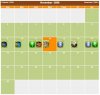
OK... my rotation is gone again... Here's a screen shot of what my WM calendar looks like today. Probably someone else's rotation appears in my calendar.
You can also see the little green and blue icons marked rotation. Will there be any changes in the rotations app in the future? It would really help if we can modify the workouts we insert via the Rotations like we can do with the workouts we enter via the normal method. I have also been doing rotations which include parts from the same DVDs (Pyramid Upper Body Biceps followed by Muscle Max Biceps, followed by PUB Triceps and then MM Triceps). I can't enter the same DVD in a given day more than once. Chris. |
|
#7
|
||||
|
||||
Thanks for sending the screen shot...
Quote:
|
![]() |
| Bookmarks |
| Thread Tools | |
| Display Modes | |
|
|